Sales Funnel Optimization: How Data Turns Leaks into Conversions
31/03/2026
The HubSpot Chrome extension is one of the most widely used tools in sales today. It’s easy to install, integrates smoothly with your CRM, and helps reps log activity without thinking twice.
But when it comes to actual data accuracy, especially for prospecting, the conversation starts to shift.
Because here’s the reality. Most sales teams are not struggling with logging emails or tracking opens. They’re struggling with finding the right people, reaching them, and trusting the data they’re working with.
That’s where the comparison between TAMI and the HubSpot Chrome extension becomes relevant.

What the HubSpot Chrome extension actually does well
HubSpot’s Chrome extension was never built as a dedicated sales prospecting extension.
It was built to support CRM workflows. So naturally, it does a few things really well.
It allows reps to track emails, log interactions, and sync activity directly into HubSpot. You can also save contacts and companies with a few clicks, which reduces manual work.
If your goal is to keep your CRM updated with activity, it works.
However, once you move beyond activity tracking and into actual prospecting, the limitations start to show.
HubSpot itself acknowledges that its data often relies on user input and integrations rather than proprietary real-time enrichment. That’s an important distinction.
Because it means accuracy depends heavily on what’s already in your system.
Where things start to break for sales teams
Now, this is where most teams feel the friction.
You’re on LinkedIn or browsing a company website. You open the HubSpot Chrome extension, expecting to find useful contact data.
Instead, you often get:
- Partial records
- Outdated job titles
- Missing emails or phone numbers
So you end up switching tools. Maybe LinkedIn, maybe another data provider, maybe even Google. At that point, the extension isn’t saving time anymore. It’s adding steps.
This is a common issue with many CRM-first tools. They are strong at organizing data, but weaker at generating or validating it.
And that’s exactly where teams start looking for HubSpot alternatives.
TAMI’s approach: built for data accuracy first
TAMI takes a very different approach.
Instead of starting with CRM workflows, it starts with data accuracy and enrichment, then plugs into your workflow.
So when you use TAMI’s sales prospecting extension, the goal is not just to log a contact. It’s to give you verified, usable data immediately.
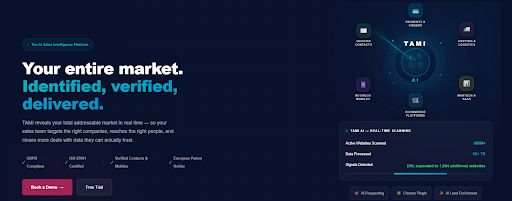
For example, when you land on a website or LinkedIn profile, TAMI can:
- Surface-verified email addresses and mobile numbers
- Show company-level insights like tech stack or payment providers
- Identify decision-makers based on your preferred criteria
All of this is pulled in real time and can be exported directly into your CRM.
That changes the experience completely.
Instead of “logging what you already know,” you’re discovering what you actually need.
Accuracy is where the real difference shows
Let’s talk about what actually matters: accuracy.
Because this is where most crm enrichment tools either deliver or fall apart.
HubSpot’s Chrome extension depends on existing CRM data, user-added information, and third-party integrations.
So naturally, accuracy varies.
In contrast, TAMI focuses heavily on data validation. Emails are verified directly to the inbox, and contact data is continuously refreshed to reflect changes like job moves or company updates.
That leads to a bounce rate below 5%, which is significantly lower than what most teams experience with standard data sources.
And this is not a small detail. If your emails don’t land, your outreach doesn’t exist.
What this means for your sales prospecting workflow
At first glance, both tools seem to support sales workflows. But when you look closer, they support very different parts of the process.
HubSpot Chrome extension:
- Best for tracking and logging activity
- Works well if your data is already clean
- Keeps your CRM organized
TAMI:
- Built for finding and validating new contacts
- Improves data quality before it enters your CRM
- Reduces time spent on manual research
So the question becomes simple.
Do you need help managing your data, or do you need help improving it?
Most teams need both. But the order matters. If the data is wrong, managing it more efficiently doesn’t solve anything.
Where do teams actually feel the difference?
Teams using the HubSpot Chrome extension usually end up building a stack around it. They use it for tracking and logging, but still rely on separate tools for prospecting, enrichment, and validation. Over time, that creates fragmentation.
Data lives in multiple places, accuracy varies, and reps spend more time switching between tools than actually selling. As a result, the B2B sales process becomes slower and less predictable.
On the other side, teams using TAMI approach this differently. Because data discovery, validation, and enrichment happen in one place, the workflow is tighter. Reps can identify a company, find the right decision-maker, and push verified data into the CRM without leaving their browser.
Real use cases from TAMI’s stack
That difference shows up quickly.
In one case, a UK-based MarTech company compared multiple data providers, including ZoomInfo, Cognism, and BuiltWith. What they found was not just a marginal improvement.
TAMI delivered significantly higher accuracy in both market research and contact data, which directly translated into stronger campaign performance.
In another example, a global logistics company used TAMI to clean and enrich a CRM database with millions of records. By removing duplicates, identifying high-potential accounts, and layering in market intelligence, they were able to generate $35M in new business opportunities in under 8 weeks.
So when you compare the two, the difference is pretty straightforward.
HubSpot helps you manage activity inside your CRM. TAMI improves the quality of the data feeding it.
And in practice, that’s what determines whether your funnel converts or leaks.
When HubSpot still makes sense
To keep this balanced, HubSpot’s Chrome extension is still valuable in certain scenarios.
If your team already has a strong data source, primarily needs activity tracking, and relies heavily on HubSpot as a CRM, then the extension does its job well.
It keeps everything aligned and reduces admin work.
But it’s not designed to solve data accuracy problems.
When TAMI becomes the better choice
TAMI becomes the better option when data quality is the bottleneck.
If your team:
- Struggles with outdated or missing contact data
- Needs verified emails and phone numbers
- Wants real-time updates on prospects
- Is spending too much time researching leads
then switching to a data-first tool changes the equation.
… It removes friction before it even enters your CRM.
Final thoughts
Comparing TAMI and the HubSpot Chrome extension is really a question of priorities.
HubSpot helps you manage what you already have. TAMI helps you improve what you’re working with.
And in most sales teams, the biggest problem is not organization but accuracy. If your data is wrong, your pipeline is unreliable. If your pipeline is unreliable, your results will be too.
Fixing that starts with better data.
If your team is still guessing who to reach out to, it’s time to upgrade your data. Book a demo with TAMI and see the difference for yourself.