

Most sales teams now have an AI chat tool open all day. The trouble is that Claude and ChatGPT don’t know which companies you should sell to, what those companies run or who to call. So people copy and paste between a chat window and a data tool.
You can fix that in a few minutes. This guide shows how to connect B2B company and contact data to Claude or ChatGPT with an MCP server, step by step. The worked example is TAMI AI’s MCP server. It covers which plans allow it, the first prompts to try, what it costs and what to check before you switch it on.
Key takeaways
- An MCP server lets Claude or ChatGPT search a B2B database while you chat. You add it once, then ask in plain English.
- In Claude, you add TAMI AI under Customize, then Connectors, with the address https://mcp.tami.ai/mcp. It takes a few minutes and needs no code.
- Claude allows custom connectors on every plan, including Free (1 connector). In ChatGPT, an admin adds them on Business, Enterprise and Edu. Pro users can connect with read-only access.
- You sign in with your own TAMI AI account. No API key goes into the chat.
- There’s no separate MCP subscription, and lookups that find nothing don’t use credits.
What does it mean to connect B2B data to Claude or ChatGPT?
It means giving your AI chat tool a live line into a B2B database, so it can look up companies and people for you instead of guessing. The link is an MCP server.
- MCP (Model Context Protocol) is an open standard for connecting AI tools to outside data and tools.
- An MCP server is a web address, run by the data provider, that your AI tool connects to. You point Claude or ChatGPT at it once.
- A connector is what Claude calls an MCP server you’ve added. ChatGPT calls it a custom MCP server.
Once it’s connected, you can ask “find UK online shops that take payments through Stripe”. The AI tool runs that search in the database and shows you the results in the chat.
Which MCP servers exist for B2B sales and prospecting?
Several B2B data providers now run their own MCP server for sales prospecting, including TAMI AI. Each B2B data MCP server connects its own provider’s database, so you need an account with that provider.
When you compare them, check 5 things:
- The data you need. Companies, contacts, phone numbers, or what a company runs, such as its payment provider, shipping carrier or ecommerce platform.
- Where it works. Claude, ChatGPT, or any other tool your team uses.
- How you sign in. Your own account login, or a shared API key.
- How it charges. A separate subscription, or the credits you already have.
- Which AI plan you need. This decides who in your team can use it (see the table below).
TAMI AI’s server searches companies and contacts, and also shows the shipping carriers, payment processors and ecommerce platforms each company uses, read from its live website. That’s useful if you sell payments, delivery or software to online businesses.
What you need before you start
You need 2 things: a TAMI AI account with credits, and a Claude or ChatGPT plan that allows custom connections. You don’t need to be a developer.
| AI tool | Plans that allow it (checked 25 November 2026) | Who sets it up |
|---|---|---|
| Claude | Free (1 custom connector), Pro, Max, Ultra, Team and Enterprise | You, on individual plans. On Team and Enterprise, an owner adds it first, then each person connects. |
| ChatGPT | Business, Enterprise and Edu, on ChatGPT web. Pro users can connect with read-only permissions. Not available on ChatGPT Free or Go. | An admin or owner. On Enterprise and Edu, admins can give selected members permission. |
Sources: Anthropic, Get started with custom connectors using remote MCP; OpenAI, Connecting custom MCP servers in ChatGPT. Both checked 25 November 2026. Menus change often, so check the latest version if a button has moved.
How to connect TAMI AI to Claude on an individual plan
Here’s how to connect B2B data to Claude on an individual plan. It takes about 5 minutes. The server address is https://mcp.tami.ai/mcp.
Step 1: Get a TAMI AI account. Use the login you already have. If you don’t have one, sign up with your work email or book a demo.
Step 2: Open Connectors in Claude. In Claude, go to Customize, then Connectors. Some Claude accounts now show this area as Plugins.
Step 3: Add a custom connector. Click + Add, then Add custom connector.
Step 4: Enter the name and address. Name it “TAMI AI” and paste https://mcp.tami.ai/mcp as the server address. That’s all TAMI AI needs. Click Continue.
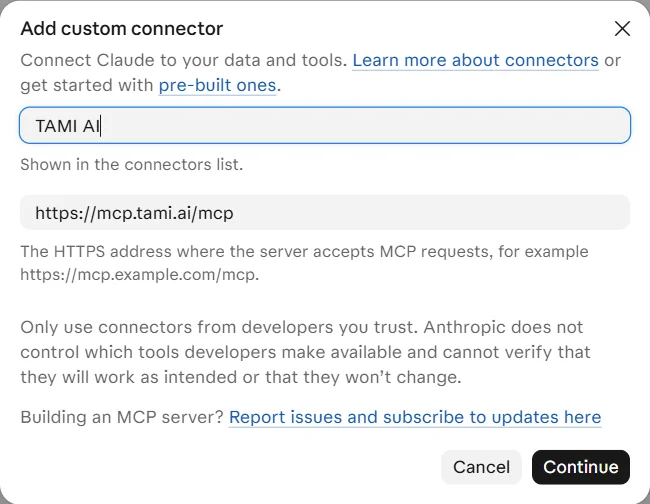
Claude’s “Add custom connector” window, 25 November 2026.
Step 5: Sign in to TAMI AI. Claude sends you to TAMI AI’s sign-in page. Log in with your TAMI AI account and approve the permissions screen. You’re sent back to Claude, and TAMI AI shows as Connected.
Claude lists 13 TAMI AI tools and marks them all as read-only. They look data up rather than change it.
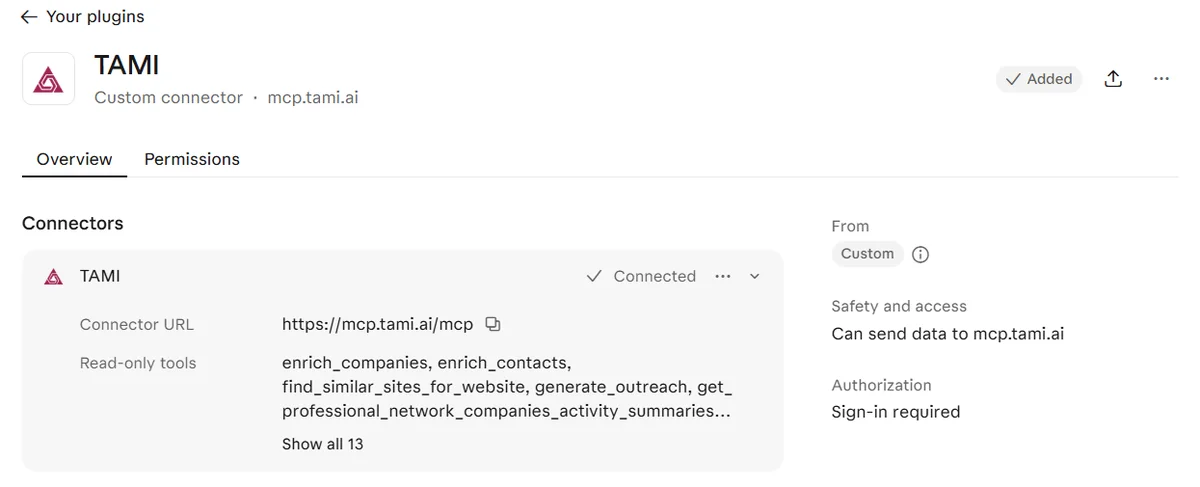
TAMI AI connected in Claude, with its 13 read-only tools, 25 November 2026.
Step 6: Turn TAMI AI on in a chat. Open a new chat, click the + button at the lower left, choose Connectors and switch TAMI AI on. You can switch it on or off for each chat.
Step 7: Ask your first question. Type a request in plain English. It helps to start with “Using TAMI AI”, so Claude knows which tool to use. Claude may ask for permission the first time it uses a TAMI AI tool. Anthropic’s advice is to read each request and only choose “Allow always” for tools you trust.
To remove or reconnect TAMI AI later, go back to Customize, then Connectors.
How to connect TAMI AI to Claude on a Team or Enterprise plan
On Team and Enterprise plans, an owner adds TAMI AI once for the whole organisation. Then each person connects with their own TAMI AI login.
- Owner: go to Organization settings, then Connectors. Click Add, hover over Custom and choose Web. Enter “TAMI AI” and
https://mcp.tami.ai/mcp, then click Add. - Each person: go to Customize, then Connectors, find TAMI AI (usually labelled “Custom”) and click Connect. Then sign in to TAMI AI as in Step 5 above.
Because everyone signs in with their own account, what each person sees in Claude matches what their TAMI AI account can see.
How to connect TAMI AI to ChatGPT
To connect B2B data to ChatGPT, an admin or owner adds TAMI AI as a custom MCP server on a Business, Enterprise or Edu workspace. These steps follow OpenAI’s help page as of 25 November 2026:
- Go to Plugins.
- Click the + button, then Add custom MCP server.
- Enter the name “TAMI AI”. A description is optional.
- Under Connection, enter
https://mcp.tami.ai/mcp. - TAMI AI uses OAuth sign-in, so complete the sign-in prompt with your TAMI AI account. Each person who uses it signs in with their own TAMI AI login.
- Read the risk warning and tick I understand and want to continue.
- Click Create as a plugin, then check the list of TAMI AI tools that ChatGPT found.
To use it, type @ in the message box and choose TAMI AI. ChatGPT only uses it for that message, so type @ again when a follow-up question needs new data.
OpenAI’s page also lists an older route for admins: Workspace settings, then Apps, then Create. You don’t need to turn on Developer Mode first.
TAMI AI’s setup page also lists Gemini Enterprise, Microsoft 365 Copilot and any other tool that supports MCP. Developers can point their own AI agent at the same address. Every tool and setting is in the TAMI AI MCP documentation.
5 first prompts to try
Start with requests you’d normally build in a data tool. Each of these maps to a TAMI AI tool:
- Build a list: “Using TAMI AI, find 10 UK online clothing and fashion shops that use Shopify and take payments with Klarna. Show company name, website, employee count and city in a table.”
- Size a market: “How many software companies in Berlin have 50 to 200 employees?”
- Look up 1 company: “Give me the full company record for iwoca.co.uk.”
- Find the right person: “Find the head of ecommerce at [company], with a verified work email.”
- Find lookalikes: “Find 20 companies similar to [website].”
You can also ask for a company’s recent news, or “How many credits do I have left?”, which is free to run.
What came back. We ran prompt 1 in Claude on 26 November 2026. Claude used TAMI AI and found 5,608 matching UK fashion and clothing companies. It showed the first 10 as a table with each company’s website, employee count and city. The search cost 1 credit. From there, you can ask for more results, narrow by size, or find the decision makers at each company.
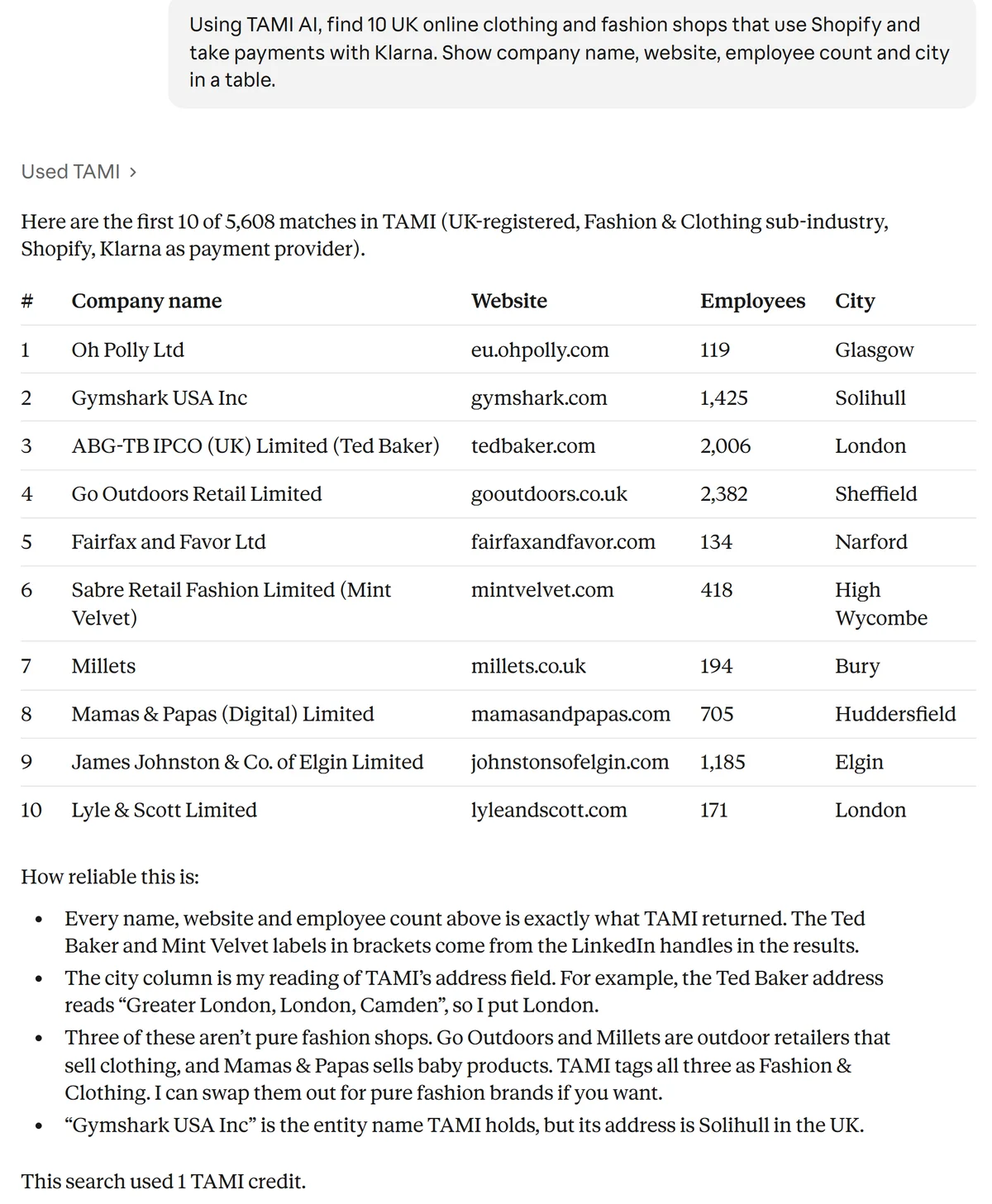
A real question and answer using TAMI AI in Claude, 26 November 2026.
Filtering by platform, payment provider and country works the same way as our count of UK online shops by payment provider. For more on Shopify lists, see how to find companies using Shopify or Magento.
What does it cost?
There’s no separate MCP subscription. Searches in Claude or ChatGPT use the same credit wallet as TAMI AI’s API and Lead Enrichment. Credits are only spent when TAMI AI returns a result, so a lookup that finds nothing costs nothing. Some tools are always free, including the one that checks your credit balance.
Each person also has a fair-use limit of 1,000 tool calls a minute, 10,000 an hour and 20,000 a day. Ask “How many credits do I have left?” at any time to see your balance and limits.
You also need the Claude or ChatGPT plan from the table above. See TAMI AI pricing for credit plans.
Is it safe? What to check before you connect
Connecting a data source to an AI tool is a security decision, so check these 6 points first. Your IT team may ask about them.
- Sign-in. You sign in with your own TAMI AI account (OAuth). No API key is pasted into the chat.
- What it can do. Claude marks all 13 TAMI AI tools as read-only (25 November 2026). They look data up rather than change it. Each person sees only what their own TAMI AI account can see.
- What TAMI AI keeps. TAMI AI’s server doesn’t store your conversations. It only receives the details of each search, and records you send through it are never added to TAMI AI’s database. Results are cached briefly.
- What the AI provider sees. The results Claude or ChatGPT receive are handled by Anthropic or OpenAI under their own terms. Check your company’s AI plan settings.
- Who you connect to. Anthropic and OpenAI both warn against connecting servers you don’t trust, because a bad server could slip hidden instructions into an AI tool. Only add servers run by companies you know.
- Data rules. TAMI AI’s MCP page says it was built to be GDPR compliant, with consent and suppression settings per country. Its professional-network data comes from a licensed provider, and activity older than 6 months isn’t returned.
For security questions, TAMI AI’s MCP documentation has a section for IT and security reviewers.
Troubleshooting
- TAMI AI’s tools don’t appear. Remove and reconnect it from the Connectors settings, then switch it on again in the chat.
- “Not found” for a person or company. Give the full website or profile address, or search by name, company and job title together.
- You’ve hit a limit. Ask “How many credits do I have left?” to see your usage and when it resets.
- Searches return nothing. Check your credit balance the same way. Anything else: email support@tami.ai.
Frequently asked questions
How do I connect an MCP server to Claude?
In Claude, go to Customize, then Connectors, click + Add, then Add custom connector. Enter a name and the server address, such as https://mcp.tami.ai/mcp for TAMI AI, then sign in. In a chat, click +, then Connectors, and switch it on.
Do I need to be a developer?
No. Connecting TAMI AI to Claude or ChatGPT takes a name, a web address and a sign-in. Developers can also point coding tools and their own AI agents at the same address.
Can I use an MCP server in ChatGPT?
Yes, on ChatGPT Business, Enterprise and Edu, where an admin or owner adds it under Plugins. OpenAI says Pro users can connect custom MCP servers with read-only permissions.
Which Claude plans allow custom connectors?
All of them, as of 25 November 2026: Free, Pro, Max, Ultra, Team and Enterprise. Free users can add 1 custom connector.
Does TAMI AI store what I type into Claude or ChatGPT?
No. TAMI AI’s MCP server doesn’t store your conversations. It only receives the details of each search it runs, such as the filters you asked for. Records you send through it are never added to TAMI AI’s database.
What does the TAMI AI MCP server cost?
There’s no separate subscription. It uses the same credits as TAMI AI’s API and Lead Enrichment, and lookups that find nothing aren’t charged.
Next steps
Connecting B2B data to Claude or ChatGPT takes a few minutes and no code. Add the server address, sign in with your own account and switch it on in a chat. After that, your team can build lists, look up companies and find the right people without leaving the chat. Start with the 5 prompts above, then try your own.
Connect TAMI AI to Claude or ChatGPT with the steps above, or book a demo to see it on your own market. For keeping your CRM up to date as well, see TAMI AI CRM Refresh.
Sources
- Anthropic, Get started with custom connectors using remote MCP (checked 25 November 2026).
- OpenAI, Connecting custom MCP servers in ChatGPT (checked 25 November 2026).
- TAMI AI, MCP server and MCP documentation (checked 25 November 2026).
- TAMI AI MCP server search, run in Claude on 26 November 2026: UK companies in Fashion & Clothing, using Shopify, taking payments with Klarna (5,608 matches, 1 credit).
About the author
Ailish O’Brien is Marketing Manager at TAMI AI. She runs the company’s website, search and AI visibility, and outbound campaigns to sales teams in payments, shipping and ecommerce. Connect with Ailish on LinkedIn.
 Counts Lie: Why More B2B Contacts Means More CRM Junk
 Best Tools for Logistics Companies to Win Freight Leads in 2027
 How to See a Company’s Ecommerce Tech Stack (Free Ways, 2026)
 Best Tools That Flag Dead Leads and Job Changes in 2026