

If you sell into the ecommerce ecosystem, figuring out how to find Shopify stores that actually match your ideal customer is where most outbound dies. There are more than 4.82 million active Shopify stores globally, with $292.28 billion in GMV processed in 2024 alone.
The problem is filtering that ocean down to the few thousand stores doing the right revenue, in the right category, in the right country, with the right tech stack, and then actually getting a verified contact you can email.
This guide walks through every realistic method for finding Shopify stores by revenue and category, from the free browser tricks to the platform-grade approaches, with honest notes on where each one falls apart. By the end, you'll know which method fits your motion, and where the real shortcut is for teams that need this at scale.
Why this is harder than it looks
Three things make Shopify prospecting harder than other tech-detection plays.
First, Shopify doesn't publish merchant revenue. There's no public API that returns "this store does £4.2M GMV." You're working with proxies.
Second, Shopify's own category structure is loose. A store selling protein powder might sit under "Health & Beauty," "Sports & Fitness," or "Food & Beverage" depending on how the merchant tagged themselves, which makes category filtering messy unless you're using something smarter than the raw taxonomy.
Third, contact data on Shopify merchants is patchy. Most merchants list a generic info@ address, not the founder's verified inbox.
So the real question isn't "where are Shopify stores listed?" It's "how do I find ones doing over X revenue, in Y category, with Z contact I can actually reach?" That's the workflow this guide is built around.
Method 1: Manual browser inspection (free, slow, limited)
The cheapest way to confirm a store runs on Shopify is to view the page source. Right-click any product page, choose "View Page Source," and search for cdn.shopify.com or Shopify.theme. If you see it, you've got a Shopify store. Browser extensions like Koala Inspector or Wappalyzer surface the same signal in one click.
This works fine if you're qualifying ten stores by hand. It falls apart the moment you need to build a list. There's no way to filter by revenue, no way to filter by category at scale, and no contact data. Useful for verifying a single account before a call. Useless for building pipeline.
Method 2: Technology detection tools
Tools like BuiltWith and Wappalyzer index millions of websites and tag the technology each one runs. You can search "all sites using Shopify" and get a list. The catch is that these tools were built for technology detection across the entire internet, not for ecommerce prospecting specifically.
What you get is a long list of domains with limited business context:
- revenue estimates are either absent or based on weak proxies
- category data tends to follow legacy taxonomy
- contact data is usually a domain-level WHOIS record rather than a verified buyer
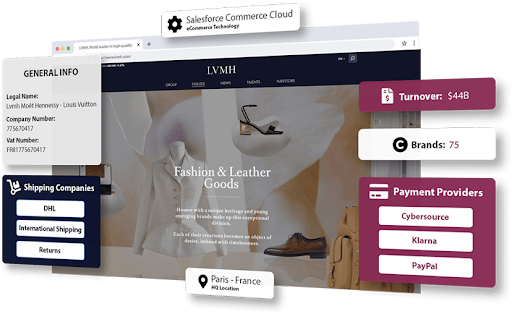
This is where the ecommerce-specific approach pulls ahead. TAMI's detection layer was designed around merchants from the start, so a Shopify identification comes packaged with merchant-grade signals that a generic technology index simply doesn't carry.
The data exists in both cases. Only one of them is usable for outbound.
Method 3: Traffic estimation as a revenue proxy
Since direct revenue isn't public, the most common workaround is to use traffic data as a proxy. SimilarWeb, Semrush, and Ahrefs all give monthly visit estimates.
A reasonable rule of thumb in ecommerce is that monthly traffic times average order value times conversion rate gives you a directional revenue estimate, with the conversion rate sitting somewhere between 1.5% and 3% for a typical Shopify store.
The honest caveat: this is directional, not accurate. Two stores with identical traffic can do wildly different revenue depending on AOV, repeat rate, and whether they're running paid traffic on margin.
Used carefully, traffic proxies can sort stores into broad revenue tiers (under £1M, £1-5M, £5-25M, £25M+) which is usually enough to qualify or disqualify.
This is also why TAMI doesn't rely on traffic alone for its merchant size detection. Combining traffic with payment processor data, shipping volume signals, app stack sophistication, and Plus subscription status gives a tighter revenue picture than any single proxy.
The shape of that combined signal is what makes the difference between "stores doing roughly six figures or roughly eight figures" and an estimate you'd actually use to prioritise a rep's day.

Method 4: Specialist Shopify directories
There are a handful of directories that focus specifically on Shopify (StoreLeads, Commerce Inspector, and a few smaller players). These tend to do a better job than generic tech detectors because they're indexing the platform deliberately.
You get filters for country, category, traffic tier, app stack, and sometimes order volume.
The strengths are real: these tools genuinely understand the Shopify ecosystem and can surface filters that BuiltWith can't.
The weaknesses show up when you try to scale outreach. Revenue is still estimated from traffic proxies, categories still follow the merchant's own tagging (which is inconsistent), and contact data is usually just an inferred email or a domain-level guess. You can find the stores. You still can't reliably email the right person.
If you use StoreLeads today, compare StoreLeads with TAMI to see what changes when the contacts come with the store list.
Method 5: The combined approach that actually scales
Here's the underlying truth most "how to find Shopify stores" guides skip. No single method gives you all four things you need: confirmed Shopify detection, accurate revenue tier, reliable category classification, and a verified contact. Teams that prospect ecommerce at scale stitch multiple sources together, or they use a platform that does it for them.
The combined approach looks roughly like this:
- Start with confirmed Shopify detection across a global merchant universe, not a partial index.
- Layer on traffic-based revenue tiers, ideally with AOV and order volume signals to sharpen the estimate.
- Apply AI-based categorisation rather than relying on merchant self-tags or SIC/NAICS codes that were never designed for ecommerce subcategories.
- Match each store to verified contact data (founder, head of ecommerce, head of growth) with bounce rates that don't destroy your sender reputation.
This is the approach TAMI was built around, which is the honest reason it keeps coming up in ecommerce prospecting conversations.
The platform holds a European patent for ecommerce merchant detection specifically because identifying a merchant accurately (and at what revenue tier, in what category, with what payment and shipping stack) is the harder problem that most data tools quietly avoid.
Real-time refresh means you're not working from a six-month-old crawl, and bounce rates kept under 5% mean the contact you pull is one you can actually reach.
For the wider view on why this combined approach matters before any outreach starts, our breakdown of ideal customer profiling covers how to define a Shopify ICP that's actually filterable rather than aspirational.
How to filter Shopify stores by revenue (without official numbers)
Since direct revenue isn't published, every viable method uses signals that correlate with revenue. The best ones combine several at once.
Monthly traffic gives you a baseline. The presence of certain apps (subscription tools, advanced analytics, loyalty platforms, post-purchase apps) signals a more sophisticated merchant, which usually correlates with higher revenue.
Whether a store has moved to Shopify Plus is one of the strongest single signals: Plus is priced for merchants typically doing over £800K in annual GMV, so a Plus detection is a useful revenue floor on its own.
The step-by-step approach
A practical tier system most teams settle on:
- Under £500K GMV: low traffic, basic theme, minimal app stack, no Plus.
- £500K-5M GMV: steady traffic, several quality apps, often a custom theme.
- £5M-25M GMV: high traffic, Plus subscription likely, advanced app stack including subscription or post-purchase tools.
- £25M+ GMV: heavy traffic, Plus confirmed, enterprise-grade app stack, often international shipping signals.
You can build this manually using SimilarWeb plus a Plus detection check, or you can pull it from a platform that already classifies stores by these tiers.
For example, TAMI handles the tiering automatically by combining traffic, app stack, payment provider, and Plus signals into a merchant size estimate that updates in real time. That makes up the difference between running a campaign on last quarter's data and running it on what's true today.
The manual route works for small lists. The platform route is what makes ongoing prospecting actually sustainable, which is why teams running serious outbound treat their merchant data the same way they treat the rest of the CRM.
Our guide to B2B data enrichment for sales teams covers what good looks like when accuracy starts to compound.
How to filter Shopify stores by category (the real challenge)
Category filtering is where naive approaches fall over hardest. Shopify's own taxonomy is loose, merchants tag themselves inconsistently, and standard SIC and NAICS codes weren't designed for the granularity ecommerce needs.
A store selling sustainable activewear could be tagged as Apparel, Fitness, Sustainability, or DTC, depending on who's looking. None of those tags is wrong. None of them is reliably useful for prospect filtering either.
Using AI the smart way
AI-based classification solves this by reading the actual content, products, and signals on a site to assign a category that reflects what the store really sells.
This matters most when your ICP is narrow: "vegan skincare brands doing over £2M in the UK," "outdoor gear merchants using Klarna and shipping internationally," "specialty coffee merchants on Shopify Plus."
Those filters are impossible against raw taxonomy. They're trivial against AI-classified data, which is exactly why the combined approach pulls so far ahead of single-method tools.
For teams whose Shopify prospecting is part of a broader market entry play (expanding into new geographies or vertical segments), this same classification layer is what makes those motions work.
What to do once you have the list
Finding the stores is half the job. The other half is reaching the right person at each one without burning your sender reputation on bounces and generic info@ inboxes.
Roughly 21.8% of all Shopify stores sit in fashion and apparel, and the contact dynamics there are different from a B2B SaaS merchant or a food and beverage DTC brand. Founders run the smallest stores. Heads of ecommerce or growth run the mid-market. Procurement and operations leads run the largest.
The piece that ties this together is verified contact data with low bounce rates, plus message sequences tuned to the merchant's tier and category. Most ecommerce outbound fails at the inbox, not at the targeting layer, which is why email campaign optimisation sits right alongside the data work.
Get both right and the same list of 2,000 Shopify merchants turns from "a list we exported once" into a repeatable pipeline source.
Final thoughts
If you're doing this once for a small project, the manual combination of Wappalyzer plus SimilarWeb plus LinkedIn research will get you there slowly. If you're doing this monthly as part of pipeline generation, stitching tools together is a tax that compounds.
The shortcut is a platform that does the detection, tiering, classification, and contact enrichment in one place, with real-time refresh so your list isn't stale by the time outreach starts.
If you're targeting Shopify merchants seriously, this is where TAMI earns its place in the stack. Book a demo and see how merchant detection, revenue tiering, AI classification, and verified contacts come together against the kind of Shopify prospect list you'd actually run a campaign against.